
%20(Website)-1.png?width=958&height=325&name=LAMBDA%20LEARNING%20LOGO%201(%20px)%20(Website)-1.png)

Key Learning Management Features: Unlocking LMS Success
Essential Learning Management Features for Success
In today's fast-paced world, learning management systems (LMS) are essential for effective education and training. They streamline the process of delivering educational content and tracking learner progress.
Organizations and educators rely on LMS to enhance learning experiences. The right LMS features can make a significant difference in achieving educational goals.
A good LMS should be user-friendly and adaptable to various learning environments. It should support diverse content formats and offer robust analytics.
Integration with other systems is crucial for seamless operations. Mobile compatibility ensures learners can access content anytime, anywhere.
Customization options allow organizations to tailor the LMS to their specific needs. Security features protect sensitive information and ensure data privacy.
Scalability is important for growing organizations. It allows the LMS to accommodate more users and content over time.
Choosing the right LMS features is key to building a successful learning environment.
What Is a Learning Management System (LMS)?
A Learning Management System (LMS) is a platform that facilitates the administration, documentation, and delivery of educational courses or training programs. It is used widely in educational institutions and corporate settings to streamline the learning process.
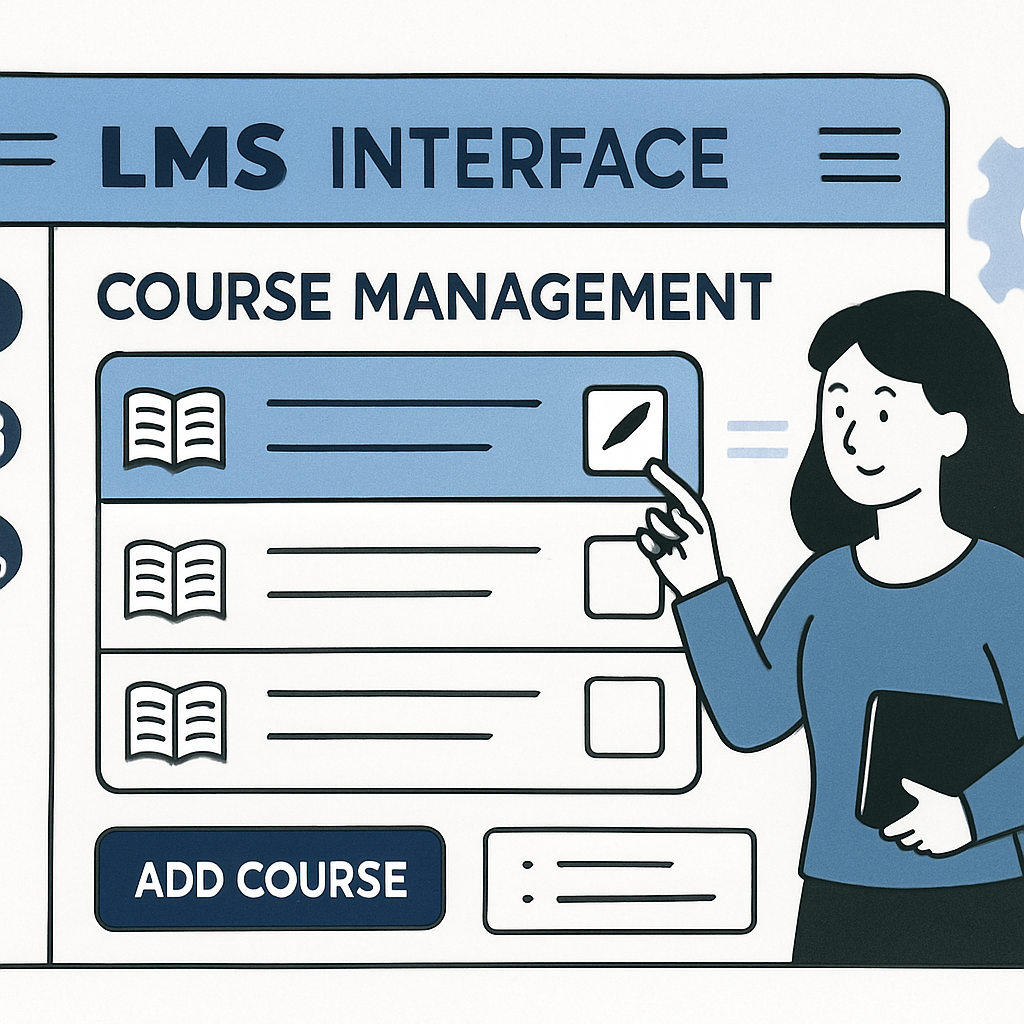
LMS platforms offer numerous features designed to enhance learning efficiency and effectiveness. Key functions include managing courses, tracking learner progress, and providing assessment tools. Additionally, they support diverse educational resources and methods.
Modern LMS solutions come equipped with various features that cater to different learning needs:
- Course management
- Assessment tools
- Progress tracking
- Multimedia support
- Mobile access
These systems simplify the teaching process by automating routine tasks. They also provide a centralized location for learners and instructors to access necessary resources. As a result, they play an integral role in today's educational and training environments. Moreover, the flexibility they offer is a significant advantage for learners in managing their educational journey.
Why Learning Management Features Matter
The features of a Learning Management System are crucial for delivering a successful learning experience. They help educators and trainers optimize their teaching methods and adapt to various learning styles. This adaptability ensures that all learners get the best possible outcome.
Certain LMS features enhance user interaction and engagement, making learning more enjoyable and effective. For example, features like gamification and social learning can significantly boost motivation. Additionally, robust reporting tools enable educators to track learner progress accurately.
Essential LMS features that drive success include:
- User-friendly interface
- Integration with other tools
- Mobile compatibility
- Customization options
Choosing the right LMS features can greatly influence the efficiency of educational programs. They contribute to meeting learning objectives while saving time and resources. Ultimately, they provide a tailored experience that aligns with organizational goals, benefiting both learners and instructors. Hence, paying attention to these features is crucial for any organization aiming to succeed in digital education.
Key LMS Features: The Foundation of Effective Learning
Essential LMS features form the backbone of a successful educational ecosystem. They lay the groundwork for delivering a comprehensive and engaging learning experience. Without these core functions, an LMS may not effectively serve its purpose.
The right features ensure that the system adapts to various educational needs. They offer flexibility and scalability, accommodating different types of learners. These capabilities enable educators and trainers to craft customized learning experiences.
Some fundamental LMS features include:
- User-friendly interface
- Robust course management tools
- Comprehensive reporting and analytics
- Mobile and responsive design
Together, these key features ensure that the LMS can support diverse learning environments. They empower educators and administrators to optimize training outcomes, driving efficiency and effectiveness across educational settings.
1. User-Friendly Interface
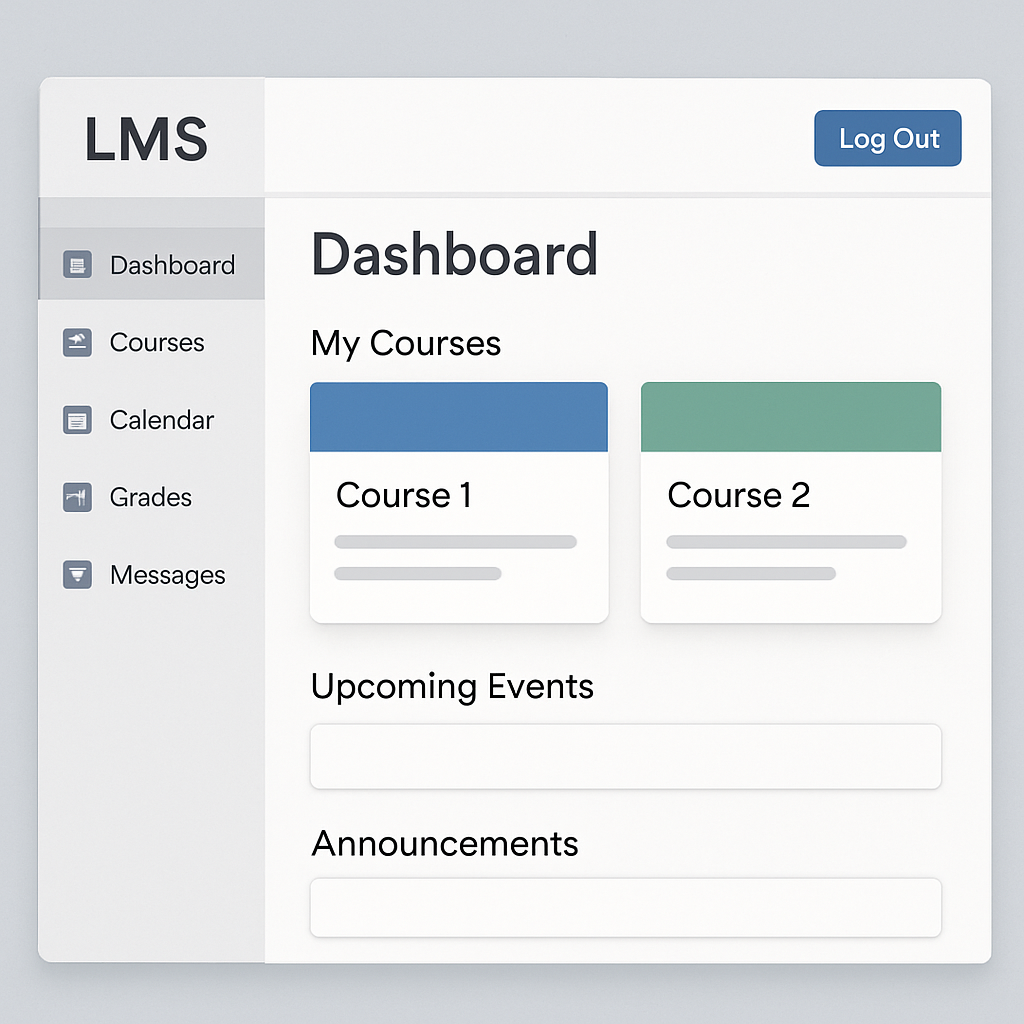
An intuitive interface is vital for any Learning Management System. It boosts user engagement and simplifies navigation. A complex system can deter users and reduce learning efficiency.
Key components of a user-friendly LMS interface include:
- Easy navigation and search
- Clear and concise design
- Dashboard simplicity
This feature ensures learners and instructors can focus on educational goals. It minimizes time spent on technical difficulties and maximizes learning opportunities.
2. Course Management Tools
Effective course management is at the heart of an LMS. It allows educators to organize and deliver content efficiently. These tools streamline the creation, delivery, and tracking of courses.
Course management tools often include:
- Scheduling and calendar features
- Course templates and libraries
- Enrollment and attendance tracking
 by Daniil Komov (https://unsplash.com/@dkomow)
Robust course management enhances learning experiences. It ensures timely updates and easy access to content. Thus, educators can focus on teaching rather than administrative tasks.
3. Content Authoring and Multimedia Support
Content authoring tools are essential for creating diverse learning materials. They allow for multimedia inclusion, enriching the learning experience. Interactive content can enhance understanding and retention.
Vital multimedia support features include:
- Video and audio integration
- Interactive elements like quizzes
- Compatibility with various file formats

These tools enable educators to design compelling courses. They support various learning styles and keep learners engaged. The ability to incorporate multimedia elements makes learning more dynamic.
4. Mobile Compatibility and Responsive Design
In today's mobile-driven world, LMSs must be accessible on all devices. Mobile compatibility ensures learning occurs anytime, anywhere. A responsive design adapts to different screen sizes and orientations.
Important features for mobile use include:
- Mobile app availability
- Offline content access
- Consistent user experience across devices

These capabilities empower learners with flexibility and freedom. They allow individuals to learn on the go, fitting education into busy schedules.
5. Integration Capabilities
Integration with other systems enhances the LMS's efficiency. It enables seamless operations and data sharing across platforms. The right integrations streamline processes and improve functionality.
Key integrations include:
- HR and CRM systems
- Content management systems (CMS)
- Third-party applications and plugins

Integration capabilities allow organizations to create a unified learning environment. They reduce redundant data entry and improve productivity.
6. Customization and Branding Options
An LMS should align with an organization's unique needs and identity. Customization enhances user experience and reflects brand consistency. Tailoring the LMS fosters a sense of ownership and recognition.
Essential customization features include:
- Theme and logo personalization
- Configurable dashboards
- Custom URL options
Such flexibility ensures the LMS fits seamlessly within existing infrastructures. It helps maintain consistency with organizational goals and aesthetics.
7. Reporting and Analytics
Data-driven insights are crucial for assessing the effectiveness of learning initiatives. An LMS with strong reporting capabilities provides detailed metrics on learner progress. Analytics help refine course delivery and strategy.
Crucial reporting features include:
- Customizable reports and dashboards
- Real-time data tracking
- Learner performance analytics

Analytics empower educators to make informed decisions. They highlight areas for improvement and celebrate successes.
8. Assessment, Testing, and Feedback Tools
Assessment tools are key in measuring learner comprehension and improvement. Effective testing features help tailor feedback for individual progress. They also identify strengths and weaknesses.
Important tools include:
- Variety of question types
- Automated grading
- Feedback loops and insights

These features motivate learners through constructive feedback. They also guide educators in refining their teaching strategies.
9. Certification and Compliance Management
Certifications validate learner achievements and motivate progress. An LMS should manage credentials and ensure compliance with industry standards. Certification tools enhance trust in training programs.
Key features include:
- Automated certification issuance
- Compliance tracking and alerts
- Expiry management of credentials

These tools help organizations meet professional requirements and maintain high standards. They ensure learners achieve recognized qualifications.
10. Social Learning and Collaboration Tools
Social learning fosters community and collective knowledge. Collaboration tools in an LMS enhance peer interaction and engagement. They create dynamic learning environments.
Key social features include:
- Discussion boards and forums
- Peer review systems
- Collaboration spaces for projects
These features encourage idea-sharing and cooperative learning. They transform individual learning into a shared experience.
11. Gamification Features
Gamification elements make learning engaging and fun. They boost motivation through game-like challenges and rewards. These features tap into natural competitive instincts.
Important gamification elements include:
- Points and badges
- Leaderboards and levels
- Challenges and quests

Gamification increases participation and enhances retention. It makes learning a rewarding experience for users.
12. Security and Data Privacy
Data security is a top priority for any LMS. Protecting sensitive information builds user trust. Comprehensive security measures prevent unauthorized access and data breaches.
Essential security features include:
- Data encryption
- Role-based access control
- Regular security audits
Robust security measures ensure compliance with data protection regulations. They safeguard the privacy of both learners and organizations.
13. Scalability and Cloud-Based Capabilities
Scalability ensures the LMS grows with organizational needs. A cloud-based LMS offers flexibility and accessibility. It reduces the need for extensive IT infrastructure.
Key scalability features include:
- Flexible user capacity
- Cloud storage solutions
- On-demand resources

These capabilities allow for seamless expansion. They ensure the LMS adapts to changing demands and technological advancements.
14. Multi-Language and Accessibility Support
A good LMS caters to diverse, global audiences. Multi-language support breaks down language barriers. Accessibility features ensure inclusivity for all learners, including those with disabilities.
Critical features include:
- Multiple language interface options
- Screen reader compatibility
- Accessible navigation and content
These features promote diversity and inclusiveness. They enable all learners to fully engage with the content.
15. Automation: Notifications, Reminders, and Enrollment
Automation streamlines administrative tasks and keeps learners engaged. Notifications ensure timely communication. They help maintain consistent participation.
Key automation features include:
- Automated reminders for deadlines
- Enrollment and registration workflows
- Activity notifications
Automation frees up time for educators to focus on instruction. It improves the overall efficiency of the learning process.
16. Learning Paths and Personalization
Personalized learning paths cater to individual learner needs and goals. They create a tailored educational experience. This approach increases relevance and engagement.
Essential personalization features include:
- Adaptive learning pathways
- Individual learner progress tracking
- Tailored content recommendations

Personalization empowers learners to achieve their best. It adapts the learning experience to suit their unique pace and style.
17. Instructor-Led Training and Blended Learning
Blended learning combines traditional and digital methodologies. It offers the flexibility of instructor-led sessions within an LMS. This approach enhances interactive learning experiences.
Key blended learning features include:
- Virtual classroom integration
- Calendar and event scheduling
- Real-time communication tools

Blended learning supports diverse educational preferences. It combines the best of both worlds for a more comprehensive approach.
18. E-Commerce and Monetization Options
E-Commerce options in an LMS allow for course sales and monetization. This feature is crucial for organizations wanting to profit from their content. Monetization can fund further content development and system improvement.
Key monetization features include:
- Payment gateway integration
- Subscription models
- Pricing and discount management
These capabilities help organizations unlock additional revenue streams. They expand the reach of educational offerings globally.
19. Advanced Search and Content Curation
Effective content curation ensures organized access to learning materials. Advanced search functionalities save time and enhance efficiency. Users quickly locate resources pertinent to their learning objectives.
Important search features include:
- Tagging and categorization
- Full-text search
- Filters and sorting options

These features improve resource management and accessibility. They foster a more focused and productive learning environment.
20. Support, Training, and Community Resources
A well-supported LMS leads to smoother operation and increased satisfaction. Comprehensive support resources assist users in maximizing system benefits. Community engagement fosters shared learning and innovation.
Crucial support elements include:
- Extensive help documentation
- Active user community forums
- Dedicated customer service channels
These resources empower users and ensure continuous growth. They create a supportive ecosystem for learners and educators alike.
Comparing Modern LMS Solutions: What to Look For
Selecting the right LMS solution requires careful consideration. With numerous options available, evaluating their features becomes crucial. A clear understanding of organizational needs guides this selection process.
Start by assessing the core features each LMS offers. Identify how these align with your specific educational goals. Consider scalability to ensure the system can grow alongside your organization.
Important aspects to compare include:
- User interface and ease of use
- Integration capabilities with existing systems
- Mobile and offline access

Beyond features, investigate vendor support and community engagement. A thriving user community can offer valuable insights and support. Prioritize flexibility and long-term viability to ensure the LMS remains useful as educational needs evolve. This thoughtful approach helps in selecting an effective, future-proof solution.
How to Choose the Right LMS for Your Organization
Choosing the right LMS requires understanding your organization's unique needs. Start by identifying your primary learning objectives and goals. Recognize the different user groups and their specific requirements.
Consider the budget and available resources for implementing an LMS. Evaluate the long-term costs, including maintenance and upgrades. Don't overlook hidden fees that might affect your decision.
Create a checklist of essential features. This ensures the LMS supports your learning and administration needs. Focus on:
- Customization and branding options
- Robust analytics and reporting tools
- Comprehensive customer support

Ensure that the LMS provides a seamless user experience. Test demo versions to gauge usability and ease of navigation. Engaging stakeholders and gathering feedback can provide useful insights. Aligning features with user expectations promotes a successful LMS deployment.
LMS Features and Benefits: Real-World Impact
An effective LMS transforms educational environments and corporate training initiatives. Real-world applications show how these systems enhance learning experiences. They provide diverse benefits that extend beyond the classroom or boardroom.
Organizations report significant gains in efficiency. Learning management features streamline administrative tasks and simplify course management. Automation tools, such as notifications and reminders, save valuable time. This, in turn, allows educators and trainers to focus on content quality and delivery.
Learners experience increased engagement and motivation due to interactive elements. Features like gamification and social learning foster a collaborative environment. They create communities where learners can share insights and ideas. Analytics and tracking tools monitor progress, allowing for timely interventions and personalized learning paths. In practice, these features translate into measurable success rates and improved satisfaction.
- Increased learner engagement
- Enhanced administrative efficiency
- Personalized and flexible learning
by UNICEF (https://unsplash.com/@unicef)
The Future of Learning Management System Features
The landscape of learning management systems continues to evolve rapidly. Emerging technologies are shaping the future of LMS features. Anticipating these changes is essential for staying ahead in educational and corporate training.
Artificial intelligence and machine learning are at the forefront of this evolution. They offer advanced personalization and adaptive learning capabilities. These technologies enable systems to deliver content tailored to individual needs and learning styles, enhancing effectiveness.
Moreover, immersive technologies like virtual reality and augmented reality are gaining traction. They create interactive and engaging learning environments. The future LMS will likely include greater integration of these tools, transforming how learners interact with content. As these features develop, the potential impact on education and training is immense.
- AI-driven personalization
- VR and AR integration
- Enhanced adaptability and interactivity

Conclusion: Building Success with the Right LMS Features
Selecting the right LMS features is vital for successful learning outcomes. A thoughtful choice aligns with both current and future needs, ensuring lasting effectiveness.
Organizations should prioritize features that enhance engagement and support diverse learning methods. This includes robust analytics, seamless integration, and mobile accessibility, which all play crucial roles in an efficient LMS.
Constantly evaluate how these features serve your educational goals and adapt accordingly. Staying informed about technological trends will help maintain an edge.
- Focus on learner engagement
- Prioritize adaptability and scalability
- Stay updated with tech advancements
By investing in the appropriate LMS features, organizations can nurture a dynamic learning environment, fostering growth and innovation.